






Step 1. Enter the super app and select “Go to Credit Service” under the Credit section.
Step 2. Choose “Debt Payment” within the Credit Service section on the JibJet page.
Step 3. Click the “Pay” button and complete the payment process.
With the “JibJet Credit Service,” you no longer need to pay the full amount at the time of purchase! This innovative payment method allows you to purchase Irancell products and services using allocated credit and pay for them at the end of the same month or in interest-free installments. The credit amount is determined based on your credit score and financial information, with no need for collateral or guarantees.


This service is designed for Irancell’s core services. You can purchase services like add-on bundles and SIM card recharge and pay for them at the end of the same month.

This service is for larger purchases, such as FTTH Internet. With this type of credit, you can pay for the desired services or products in installments over a specified period in 4 installments. The JibJet Installment Credit Service will soon be extended to non-Irancell products and services as well.
Enjoy Irancell’s services and products without the need for upfront cash payments.
Access the service with a simple credit assessment—no paperwork needed.
Purchase various Irancell offerings on credit, from internet and call packages to selected products.
Activate the service in just a few clicks and start using it instantly
Easily manage your installments and payments through the MyIrancell app.


Since this service is in the pilot phase, only some users can apply for it. After submitting a request and if eligible, credit will be allocated to them.
If you are deemed eligible after credit assessment, a specific amount of credit will be allocated to you, which you can use.
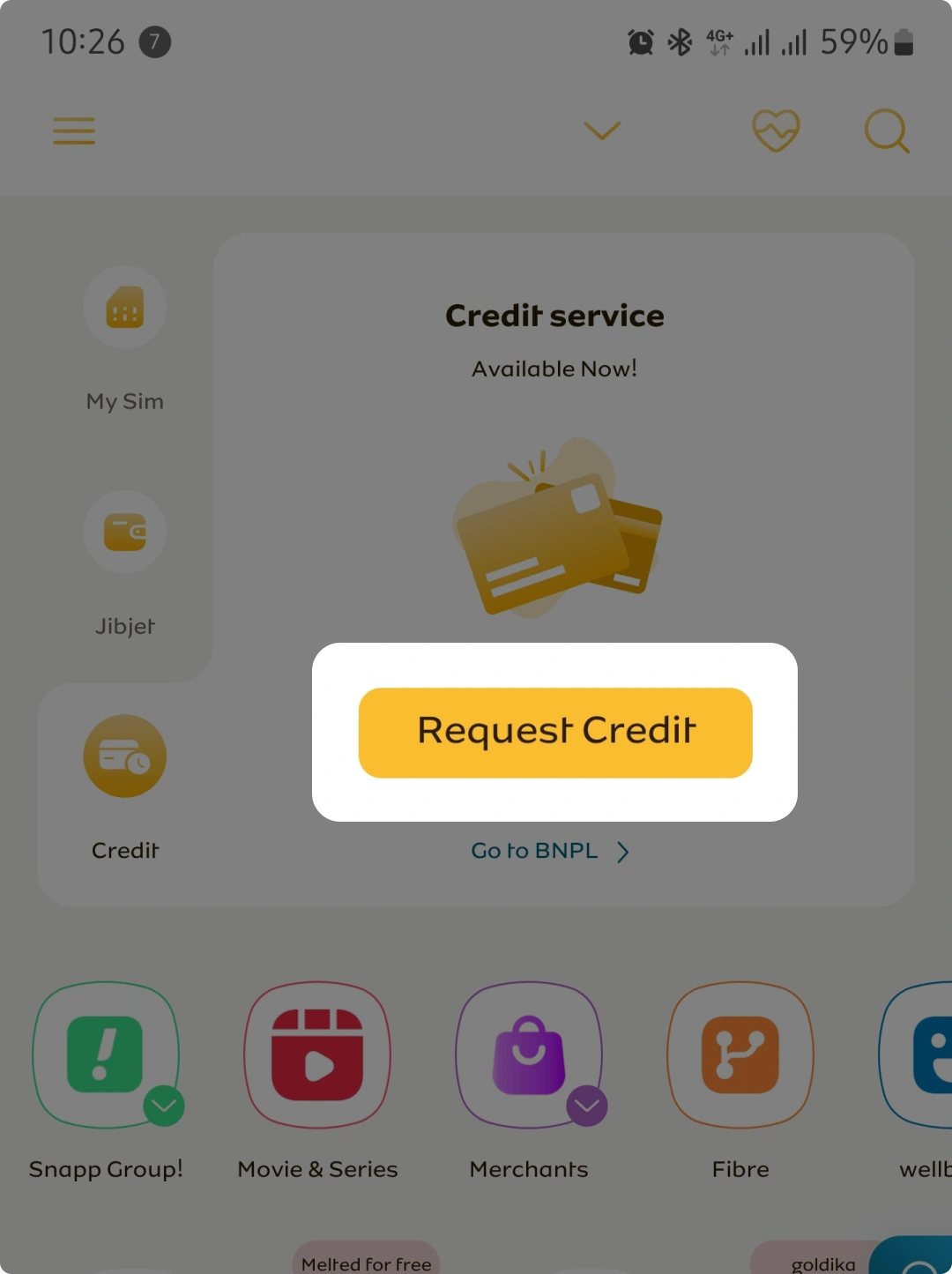
Log in to the MyIrancell superapplication and select ‘Request Credit’ in ‘Credit’ tab.
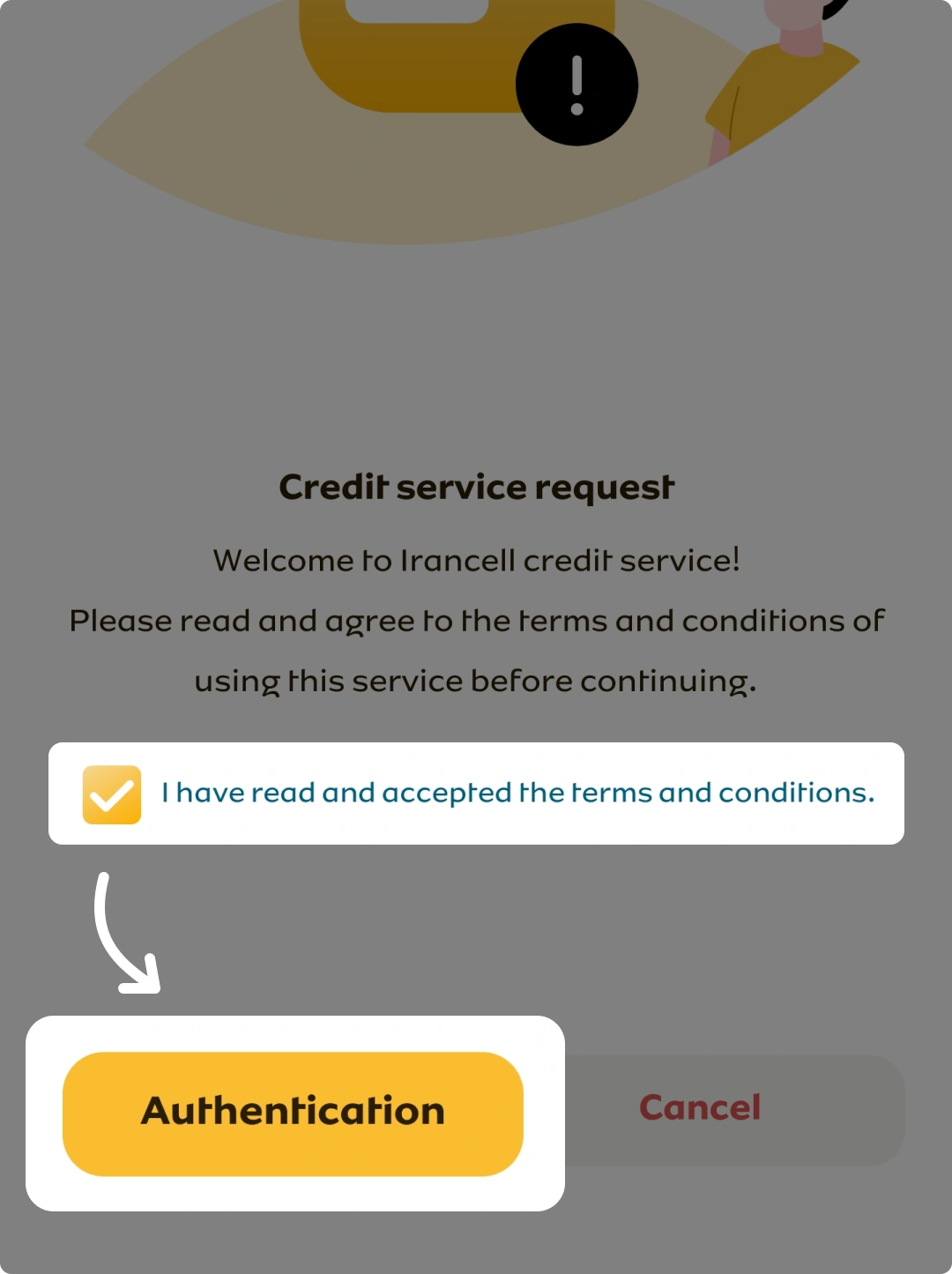
Read the terms and conditions, check the box to accept, and select ‘Autentication’.
Enter the received on-time password (OTP).

If you are deemed eligible after credit assessment, a specific amount of credit will be allocated to you, which you can use.
Once credit is allocated, you can choose the JibJet Credit Service (end-of-month settlement/installment) when purchasing services or products in the Irancell Online Shop or through the MyIrancell super application. In the future, it will be possible to use the credit service for purchases from other stores as well.
The repayment process in the JibJet credit service, through theMyIrancell super application, is via the Jibjet digital wallet and Shetab Bank cards through the banking gateway.
you pay the first installment at the time of purchase, and the remaining installments are paid monthly at the end of each month.
you pay the first installment at the time of purchase, and the remaining installments are paid monthly at the end of each month.

Log in to the MyIrancell application or the web app at my.irancell.ir and follow the steps below:

You just need to visit the below link and enter your contact number to pay the debts.
Irancell Online Store
Dial *46# USSD via your Irancell lines and after receiving the SMS and checking the debt amount, pay the debt.


Log in to the MyIrancell application or the web app at my.irancell.ir and follow the steps below:
Step 1. Enter the super app and select “Go to Credit Service” under the Credit section.
Step 2. Choose “Debt Payment” within the Credit Service section on the JibJet page.
Step 3. Click the “Pay” button and complete the payment process.
You just need to visit the below link and enter your contact number to pay the debts.
Irancell Online Store
Dial *46# USSD via your Irancell lines and after receiving the SMS and checking the debt amount, pay the debt.
If you need guidance or more information, you can easily contact our experts (through the “Contact Us” section) at any time or refer to the FAQ section.
click to view the terms and conditions of buying fiber optic installments.
Customer Obligations
Irancell Obligations:
Irancell is committed to provide all the services predicted in this document in full compliance with the laws of the Islamic Republic of Iran, including the e-commerce law.
Purchase Cancellation Before Receiving the Goods and Service Installation:
Users of fiber optic internet service through Irancell’s credit service can cancel the order and request a refund after placing the order and before installation and activating the service (before any action related to the cabling of the service). If the Users, in addition to using the granted credit, have used other payment methods such as using a digital wallet or bank gateways, the Users’ payment will be returned to their digital wallet.
Authority to Make Changes:
Irancell is authorized to make changes in its terms and conditions with users based on necessity or discretion. These changes can be made at any time without informing the users. So, users should re-read the terms and conditions under this agreement from time to time in order to be aware of probable changes. In case of any changes in mentioned rules, it will be published and updated on this page. Since these changes can include minor changes in some terms and conditions to changing the entire content of the terms and conditions, users are advised to review the rules section of this website at appropriate intervals in order to be informed of probable changes. Evidently, the users are obliged to comply with the rules of these terms and conditions and all changes in its provisions, and in case of violation of the rules, no excuse from the user, including lack of knowledge of the rules or the changes made, will not be accepted.
Guarantee of Non-compliance with Terms and Condition:
In case of non-compliance with the terms and conditions mentioned on this page, Irancell may suspend the account for a limited period of time or permanently; and claim compensation for any material or moral damages incurred.
Support:
Users can contact the support team for any problem raised in activation of your account or using the services as well as technical problems. Users should contact support team by calling 700 (for Irancell lines) or 09377770000 (for other lines).
As the subject user of this document, by carefully reading the above content and being aware of the contents of the present terms and conditions document, I hereby declare my agreement with all the above content and waive the right of any objection.
Fiber Optic Service (Installment) Purchase Terms and Conditions
The applicant for the purchase of fiber optic service is obliged to accept and comply with the following terms and conditions:
1. The applicant must pay the amount of IRR……….. (VAT inclusive) in 4 installments as follows:
A. IRR………… as the first installment on the date of …………
B. IRR…………. as the 2nd installment on the date of …………
C. IRR…………. as the 3rd installment on the date of …………
D. IRR………….as the 4th installment on the date of …………
2. The first installment must be paid in the system at the same time as the purchase request (final order) is submitted.
3. The deadline for paying other installments is the end of each solar month, and the deadline for paying the debt without late payment fee is the fifth day of the following month. After this deadline, settlement will be subject to a penalty as described in Article 9 of this document.
4. The customer can settle their debt all at once before the installments are due.
5. The customer acknowledges that the ownership of the fiber optic service shall transfer to the customer only upon payment of the entire payable amount, whether paid in one lump sum or settled in installments.
6. Since the modem and equipment that are the subject of this document are possessed in trust by the customer until the installments are fully settled, they are obligated to preserve them until all the installments are settled. Also, the customer is responsible for the occurrence of any consequences and its follow-up or compensation for all probable damages. In case of violation of the provisions of this paragraph, Irancell is allowed, in addition to canceling its obligations towards the customer, not allocating any credit to them, and not returning the equivalent of Rials from the remainder of the allocated Internet package and the installments paid for the service (after calculation and deduction of the penalty and the cost of the used internet package), according to this document, by referring to the legal authorities, claim the damages caused by the customer. The provisions of this paragraph shall not prevent applying the penalty against the customer.
7. If the customer has not paid their overdue debt after passing the 5-days grace period (the deadline for paying the bill without penalty), the penalty will be calculated from the beginning of the month (5 days of grace period will also be subject to a penalty). Therefore, the customer must pay the sum of the penalty and unpaid installments to Irancell at once. Also, as the case, Irancell is allowed to disconnect the service, and is allowed to reclaim the equipment, not allocating any credit to customer, not returning the Rial equivalent of the remainder of the allocated Internet package, and the installments paid for the service (after calculating and deducting the penalty and the cost of the used internet package) will be in accordance with the provisions of this document.
8. Since the modem and equipment that are the subject of this document are possessed in trust by the customer until the payable amount is fully settled, in the event that the customer intends to change the physical location of the service during this period and has notified Irancell support of this, the customer shall remain fully responsible for fulfilling all financial obligations and installment payments related to the service. A change in residence shall under no circumstances release the customer from liability or alter the repayment terms stipulated in this document.
Obviously, following the full payment of installments and the transfer of ownership, any relocation of the fiber optic service requires coordination with Irancell support to evaluate the service coverage at the newly designated location.
9. The calculation method for the penalty of delayed/unpaid installments is as follows:
A) Due to the failure in timely settlement of the installments for the first and second months, 3% of the total unpaid installments of the customer will be considered as a delayed penalty each month, on a daily basis;
B) However, it will be raised to 4% from the expiry of the 2nd month to the 10th month thereof.
10. Irancell is committed to full and safe delivery of the equipment and modem with a valid and one-year warranty for its installation and operation, as well as the allocation and activation of the internet package under this document to the customer, and authentication from the customer is the receipt of the equipment.
11. The activation of the modem and internet package must be done by the representatives of Irancell, otherwise Irancell is not responsible for probable technical defects or non-functioning of the equipment subject to the document.
12. Irancell is committed to providing support services to implement the subject of this document through the contact number 789 (for Irancell lines) or 09377890000 (for other lines) to the customer.
By accepting this document, the customer declares that they have understood the subject of fiber optic service including the modem with the model ……. as well as the initial package and the installation fee, the details of which can be found on Irancell’s website at ……… and waives any right of objection regarding the provisions of this document.
The “JibJet Credit Payment” service allows you to purchase Irancell products and services, with the option to pay at the end of the month or in installments. This service does not include interest and does not require a guarantor.
Since this service is in the pilot phase, only a limited number of users are allowed to request credit. If you are eligible for credit, you can enter the JibJet section through the MyIrancell super application and scroll to the JibJet Credit Service tab. After selecting the Request Credit option and entering the received one-time password (OTP), the credit assessment process will begin. If you are deemed eligible after the assessment, a specific credit amount will be allocated to you, and the service will be activated.
Yes. This credit assessment may include reviewing your credit score and financial information.
No, this service does not include interest or fees.
By visiting the main page of the MyIrancell Super Application and navigating to the “Credit” section, you can easily settle your credit service balance online using any Shaparak member card.
If you wish to pay off your debt before the due date, simply click on the corresponding graph in the “My Irancell” app to complete your online payment.
For your convenience, the bill and payment identifiers will be sent via SMS to all subscribers, allowing you to make payments through banks and ATMs as well.
If you fail to pay your installments on time, a late payment penalty may apply, and your credit score may be affected. You may also face progressive restrictions.
Currently, this service can be used to purchase Irancell products and services, and it will soon extend to non-Irancell products and services.
Yes, you can settle the full amount of your debt before the due date.
Yes, timely installment payments can improve your credit score, while delayed or missed payments may reduce it.
Yes, this amount includes one installment of the total purchase cost, and the remaining installments will be paid monthly.

